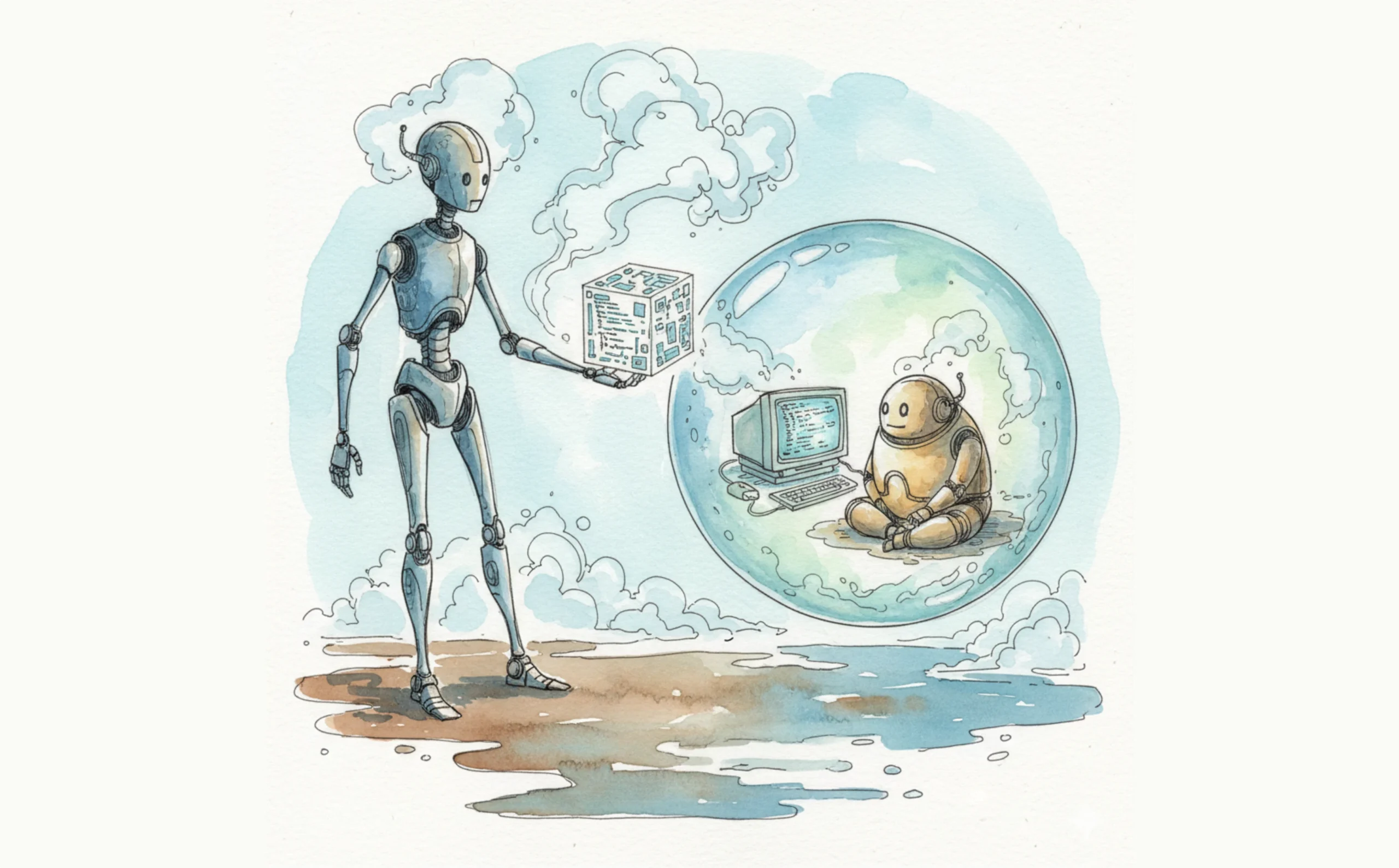
Cloudflare’s ‘Code Mode’ got some attention in the AI developer community recently, thanks to a popular blog post about it.
It’s based on the ‘CodeACT‘ pattern for AI agents which is something I’ve been interested in for a while now.
These are my initial first-hand impressions of using it.
What is CodeACT?
Most LLM-based AI agents work by having an LLM ‘call tools’ by generating JSON. In these, the agent harness interprets that JSON and decides what code to run (e.g. calling out to a weather API.)
In CodeACT, the LLM generates code instead of JSON. The agent harness executes that code. The code may involve the equivalent of what the tool calls would have done (e.g. calling out to a weather API.)
Generating code can potentially be more effective than generating JSON for a number of reasons:
- Flexibility: Code can easily express loops, conditional logic, and the dynamic composition of multiple tools, none of which is possible with JSON.
- Code fluency: Since there is so much code in LLMs’ training data, they may be better at generating code than generating the equivalent structured JSON.
- Task success improvement: The approach can potentially result in higher success rates than JSON-based approaches.
That’s all quite enticing.
But there are downsides, too:
- Increased security risks: Executing arbitrary code opens potential attack surfaces and requires stringent safety controls.
- Greater fragility: Generated code could crash the agent without straightforward fallback or recovery mechanisms.
- Sandboxing requirements: Careful containment is needed to avoid infinite loops, resource exhaustion, or unintended system impact.
- Challenging debugging and monitoring: Diagnosing and recovering from code errors can be more complicated than handling misformatted JSON.
Where Does Cloudflare Code Mode Come In?
Cloudflare’s Code Mode is a library for building CodeACT-inspired agents on top of Cloudflare’s Workers platform.
Why is it interesting?
Firstly, it makes it easy to execute code generated by your LLM in a very lightweight sandboxed environment (in this case a Cloudflare Worker).
Secondly, it provides ‘bindings’ which let you pass functionality into the sandbox’s environment in the form of functions that can be called from within the sandbox but that execute outside of it.
This seems like a great fit for executing code that relies on secrets that you don’t want to expose to the LLM and for restricting what access to outside systems you want the agent to have.
For example, for a customer support agent responding to a ticket from a given customer, you might provide a binding giving read-only access to all support tickets related to that customer. This would allow the agent to fetch useful context without it seeing either (a) credentials for accessing the customer support system as a whole, or (b) tickets related to other customers.
Let’s See Code Mode in Action!
I set up a simple Code Mode agent using sample code provided by Cloudflare.
If you’d like to take a look or try it yourself, you can find the code here.
You can define tools using the tools array, something like this:
import { tool, jsonSchema } from 'ai';

export const tools = {
  getWeather: tool({
    description: 'Returns a silly canned weather string.',
    inputSchema: jsonSchema({
      type: 'object',
      properties: {},
      additionalProperties: false
    }),
    outputSchema: jsonSchema({
      type: 'string'
    }),
    execute: () => "It's cold. Brrrrrrrr!"
  })
};
To better understand how Code Mode works, let’s look at what happens when we ask the agent about the weather…
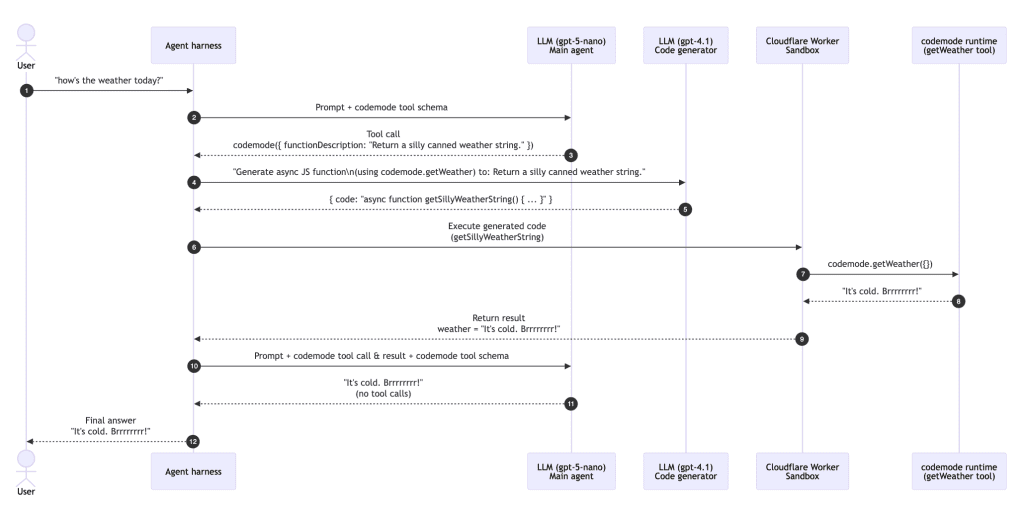
1. First Iteration of Agent Loop
The LLM is given the user’s prompt (in this case, “how’s the weather today?”) and told it has access to a ‘codemode’ tool that can return a canned weather string:
{
  "model": "gpt-5-nano",
  "input": [
    {
      "role": "developer",
      "content": "You are a helpful assistant. You have access to the \"codemode\" tool that can do different things:

- Returns a silly canned weather string.

If the user asks to do anything that can be achieved by the codemode tool, then simply pass over control to it by giving it a simple function description. Don't be too verbose."
    },
    {
      "role": "user",
      "content": [
        {
          "type": "input_text",
          "text": "how's the weather today?"
        }
      ]
    }
  ],
  "tools": [
    {
      "type": "function",
      "name": "codemode",
      "description": "codemode: a tool that can generate code to achieve a goal",
      "parameters": {
        "type": "object",
        "properties": {
          "functionDescription": {
            "type": "string"
          }
        },
        "required": ["functionDescription"],
        "additionalProperties": false,
        "$schema": "http://json-schema.org/draft-07/schema#"
      },
      "strict": false
    }
  ],
  "tool_choice": "auto",
  "stream": true
}
The harness parses the response from the first LLM call and finds a call to the 'codemode' tool with the argument "Return a silly canned weather string."
Note that, so far, this is standard tool-calling agent stuff.
‘Calling the code mode tool’ is where things get interesting.
2. Code Generation
To ‘call the code mode tool,’ first we need to generate some code, then we need to execute that code in a suitably sandboxed environment and return a result.
We insert the function description provided by the first LLM into the prompt below.
Note that we tell the LLM about the getWeather function that it can use.
The LLM in this case isn’t given any tools; it is just asked to generate suitable code:
{
  "model": "gpt-4.1",
  "input": [
    {
      "role": "user",
      "content": [
        {
          "type": "input_text",
          "text": "You are a code generating machine.

In addition to regular javascript, you can also use the following functions:

interface GetWeatherInput {}
export type GetWeatherOutput = string

declare const codemode: {
/*
Returns a silly canned weather string.
*/
    getWeather: (input: GetWeatherInput) => Promise<GetWeatherOutput>;
}

Respond only with the code, nothing else. Output javascript code.

Generate an async function that achieves the goal. This async function doesn't accept any arguments.

Here is user input: Return a silly canned weather string."
        }
      ]
    }
  ],
  "text": {
    "format": {
      "type": "json_schema",
      "strict": false,
      "name": "response",
      "schema": {
        "type": "object",
        "properties": {
          "code": { "type": "string" }
        },
        "required": ["code"],
        "additionalProperties": false,
        "$schema": "http://json-schema.org/draft-07/schema#"
      }
    }
  }
}
3. Sandboxed Code Execution
The Code Mode harness extracts the code provided by the LLM in its response to the second call above:
async function getSillyWeatherString() {
  const weather = await codemode.getWeather({});
  return weather;
}
It executes it within a Cloudflare Worker.
When it executes codemode.getWeather() it makes use of the binding provided to the Cloudflare Worker. The code defined for the getWeather tool is executed outside of the worker (but still within Cloudflare’s infrastructure).
The result of "It's cold. Brrrrrrrr!" is passed back into the worker in response and assigned to the ‘weather’ variable.
The same value is then returned back to the agent harness (via "return weather;")
From here on we’re back to a standard LLM-in-a-loop agent mechanism.
4. Second Iteration of Agent Loop
Having completed the ‘tool call’, the harness now runs a new iteration of the main agent loop.
It calls the LLM much as in the first call, but this time with extra messages representing the tool call from the first LLM response and the result of that tool call:
{
  "model": "gpt-5-nano",
  "input": [
    {
      "role": "developer",
      "content": "You are a helpful assistant. You have access to the \"codemode\" tool that can do different things:

- Returns a silly canned weather string.

If the user asks to do anything that be achievable by the codemode tool, then simply pass over control to it by giving it a simple function description. Don't be too verbose."
    },
    {
      "role": "user",
      "content": [
        {
          "type": "input_text",
          "text": "how's the weather today?"
        }
      ]
    },
    {
      "type": "item_reference",
      "id": "rs_0c6286506bb0ecd000691ca8b6b06881a3a7e6ce44822039e5"
    },
    {
      "type": "item_reference",
      "id": "fc_0c6286506bb0ecd000691ca8b86b5081a39a78381020daee0d"
    },
    {
      "type": "function_call_output",
      "call_id": "call_mKI1Yw7jLIeyqi4U9jKBZmyc",
      "output": "{\"code\":\"async function getSillyWeatherString() {\\n  const weather = await codemode.getWeather({});\\n  return weather;\\n}\",\"result\":\"It's cold. Brrrrrrrr!\"}"
    }
  ],
  "tools": [
    {
      "type": "function",
      "name": "codemode",
      "description": "codemode: a tool that can generate code to achieve a goal",
      "parameters": {
        "type": "object",
        "properties": {
          "functionDescription": {
            "type": "string"
          }
        },
        "required": ["functionDescription"],
        "additionalProperties": false,
        "$schema": "http://json-schema.org/draft-07/schema#"
      },
      "strict": false
    }
  ],
  "tool_choice": "auto",
  "stream": true
}
This time, the LLM returns some text (“It’s cold. Brrrrrrrr!”) and no tool calls.
To the harness, this means the agent loop is complete.
The harness duly returns the text to the user.
Observations
Two-Step Code Generation
It’s interesting that the harness doesn’t try to get the first LLM call to generate code; it just tries to get a description of the function, then uses that description in a subsequent LLM prompt to generate code.
I guess this separation slightly simplifies the jobs that the LLMs in each case need to do which may make the overall result more reliable.
On the other hand, this could have a couple of downsides:
- The second LLM only sees the target function description provided by the first LLM rather than the full context of what is desired. I imagine this could result in code that isn’t quite as suitable.
- Making two sequential LLM calls rather than one entails more latency.
I would be interested to learn whether Cloudflare considered a one-step approach at all and how other CodeACT-inspired implementations have approached this.
Model Choice
I was a little surprised that the LLM call to generate code used a different model (gpt-4.1) from the one specified in my code and used for the agent loop (gpt-5-nano). That currently seems to be hardcoded into the Code Mode code, but perhaps will be made configurable in the future.
Prompts
I was perhaps equally surprised by the wordings of the LLM prompts that Code Mode uses for the main agent loop and to generate code. They both seem quite vague about what, exactly, they want the LLM to do.
Closing Thoughts
Cloudflare’s Code Mode seems a very interesting option for running CodeACT-style agents in the cloud, given (i) how lightweight (as I understand it) the V8 isolates are that their workers run within, compared to other providers’ sandbox technologies, (ii) their support for bindings, and (iii) Cloudflare being a large company that can be trusted to be around for a while.
Earlier in the year I tried out Hugging Face’s smolagents library which offers ‘CodeAgents’ which are also based on the CodeACT pattern. That’s a Python-based option that is also worth a look.
Have you tried Code Mode, smolagents or similar offerings from other providers?
If so, I’d be curious to know how you’ve got on!
Leave a Reply