
The Ultimate Guide to Web Search APIs for AI Agents
Last updated: 13th July 2026
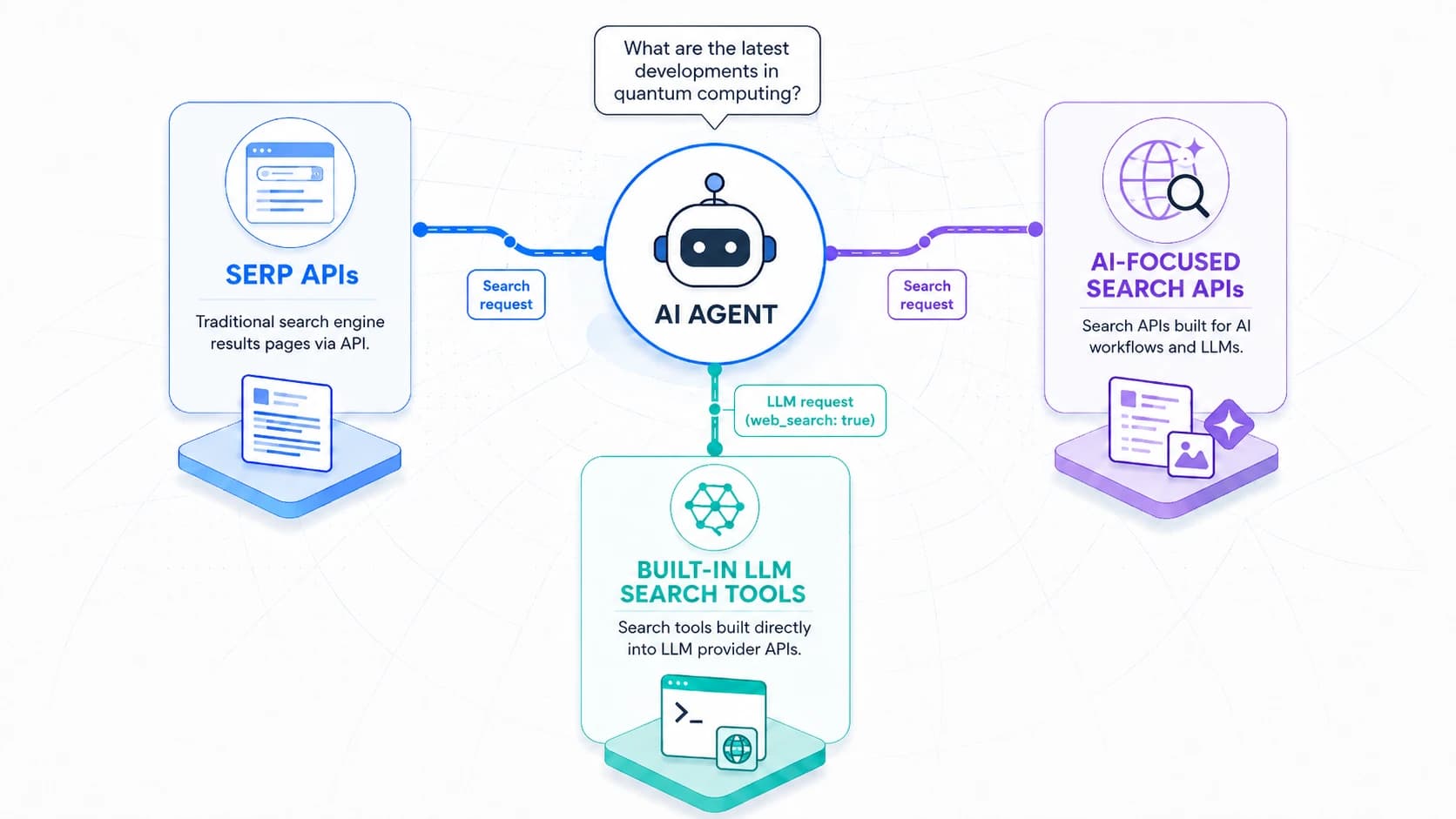
Why Use a Web Search API With an AI Agent or Workflow?
You may want a web search API if you're building or using an AI agent or RAG workflow that needs publicly-available information that's more recent than the data the underlying model was trained on.
An AI fact checking tool, for example, might need to search the web to retrieve content relating to a fact that it is checking.
The Three Main Types of Web Search API
Type 1: SERP APIs
SERP APIs are wrappers around the human-first web interfaces provided by traditional web search engines, typically Google. They work by scraping the pages returned by the search engine.
Pros
- Cost:They can be very cheap, as they're not having to maintain their own search index.
Cons
- Complexity:As these services only return a small snippet of content for each search result, your system will often need to follow up by fetching the contents of the corresponding URL and parsing it for consumption by the LLM.
- Latency:They tend to be higher latency than other options.
- Dependency on underlying search engine:Google doesn't like people piggybacking on their services in this way and have been both contesting the legality of such practices and putting more and more technical hurdles in place. So far this hasn't stopped the providers from operating but that could potentially change in the future.
| Name | Free Tier | Lowest-Volume Paid Tier | Lowest Advertised Cost (at Scale) * | Search Index | Content Snippet Size | Highest Advertised Rate Limit * |
|---|---|---|---|---|---|---|
| Apify | 1111 calls/month | $4.50 per 1000 calls | $1.80 per 1000 calls | 160 chars | 60 calls per second | |
| Bright Data | n/a | $1.50 per 1000 calls | $1 per 1000 calls | 160 chars | no limit | |
| DataForSEO | n/a | $0.6 per 1000 calls (min. $50) | $0.6 per 1000 calls | 160 chars | 2000 calls per minute (avg. 33 calls/sec) | |
| SearchAPI | 100 free calls | $40/month for 10,000 calls | $1 per 1000 calls | 160 chars | 20% of monthly call volume per hour | |
| Serper | 2500 calls | $50 (valid for 6 months) for 50,000 calls | $0.30 per 1000 calls | 160 chars | 300 calls per second | |
| SerpApi | 250 calls/month | $75/month for 5,000 searches | $5.50 per 1000 calls | 160 chars | 20% of monthly plan volume per hour |
Type 2: AI-Focused Web Search APIs
The rise of LLMs and AI agents has led to a range of providers offering a new style of web search API aimed specifically at AI use cases.
These tend to operate their own web search indexes and have APIs that return much larger amounts of context from the underlying pages, in a form that's suitable for consumption by LLMs.
They often have two flavours of API: one that returns search results; another that goes a step further and returns answers based on those results.
Pros
- Choice:You get to choose from a range of providers, each with their own search index and set of advanced features. If, later, you want to switch to a different provider, it's likely to be relatively straightforward.
- Simplicity:You don't need to worry about the complexities of fetching and parsing web content as the provider has already done this for you.
Cons
- More LLM call round trips:Your system is likely to make more calls, on average, to the LLM provider's API than if using their built-in web search tool. In some circumstances this could lead to slightly higher latency.
| Name | Free Tier | Lowest-Volume Paid Tier | Lowest Advertised Cost (at Scale) * | Search Index | Content Snippet Size | Highest Advertised Rate Limit * |
|---|---|---|---|---|---|---|
| Brave | 1000 calls/month | $5 per 1000 calls | $5 per 1000 calls | Brave | 400 chars | 50 calls per second |
| Exa | 1000 calls/month | $7 per 1000 calls | $7 per 1000 calls | Exa | Entire page | 10 calls per second |
| Firecrawl | 500 calls/month | $19/month for 2500 calls | $1.50 per 1000 calls | Firecrawl | Entire page | 2500 calls per minute |
| Linkup | 1000 calls/month | $5 per 1000 calls | $5 per 1000 calls | Linkup | Up to 5000 chars | 10 calls per second |
| Parallel | n/a | $5 per 1000 calls | $5 per 1000 calls | Parallel | Compressed excerpts | 600 requests per minute |
| Tavily | 1000 calls/month | $8 per 1000 calls | $5 per 1000 calls | Tavily | 3000+ chars | 1000 calls per minute (avg. 17 calls/sec) |
| you.com | $100 of free credits | $5 per 1000 calls | $5 per 1000 calls | you.com | 600 chars | Not advertised |
Type 3: Web Search Tools Built Into LLM APIs
Major LLM providers including Anthropic with Claude, OpenAI, Google with Gemini, and Grok each now support an option that effectively allows their model to do one or more web searches and/or fetches on the provider's side and then use the retrieved information to inform its response.
Pros
- Model familiarity:The model is likely to have had more training with the provider's built-in web search tool than any other, so it's likely to use it effectively.
- Simplicity:You don't need to worry about the complexities of fetching and parsing web content.
Cons
- Less flexibility:You have to use your LLM provider's underlying web search tool even if you'd prefer that of another provider.
- Less control:Depending on the API, you may have less control over how many web searches the model does in parallel or sequentially. This can impact cost and latency.
- Cost:Calls to built-in tools tend to be more expensive than calls to 3rd-party ones.
| Name | Free Tier | Lowest-Volume Paid Tier | Lowest Advertised Cost (at Scale) * | Search Index | Content Snippet Size | Highest Advertised Rate Limit * |
|---|---|---|---|---|---|---|
| Claude | n/a | $10 per 1000 calls + cost of tokens | $10 per 1000 calls + cost of tokens | Brave | Not exposed via API | Unknown |
| Google Gemini | 5000 prompts/month (shared) | $14 per 1000 calls | $14 per 1000 calls | Not specified | Unknown | |
| Grok | n/a | $5 per 1000 calls | $5 per 1000 calls | Not specified | Not specified | Unknown |
| OpenAI | n/a | $10 per 1000 calls + cost of tokens | $10 per 1000 calls + cost of tokens | Bing? (unconfirmed) | Configurable | Unknown |
How do AI Agents do Web Searches?
Under the hood, AI agents search the web through functionality baked into LLMs known as tool calling, tool use, or function calling.
There a few ways this currently works.
1. Harness Requests LLM Provider's Built-in Web Search Tool
As mentioned earlier, major LLM providers such as Anthropic, OpenAI and Google each provide hosted web search tools that can be made available to the model by specifying so via the provider's API. If the model decides to use the tool, the entire workflow of searching, processing, and often citing information is handled on the API provider's side before a response is returned. This can involve multiple search iterations where necessary.
2. Harness Calls Web Search API
Alternatively, an AI agent harness can implement a web search tool itself. If the LLM chooses to call the tool, the harness calls out to a web search API and provides the results back to the model. This is the standard way that agent tool calls, more generally, are handled.
3. Harness Sends Queries to Web Search MCP Server
Lastly, many harnesses allow users to connect tools via MCP. In such cases, the user may choose to connect an MCP server that offers a web search tool. If the LLM chooses to call the tool, the harness sends the call to the MCP server, receives results back from it, and passes those results back to the model.
What to Consider When Choosing a Web Search API or Tool
1. Type of Tool
As explained above, there are three different types of web search tool. Review their pros and cons to see which looks like the best fit for your situation.
2. Underlying Search Index
Different services use different search indexes to retrieve their results.
SERP API services tend to be wrappers around Google Search and will therefore return very similar results to each other.
Other services have their own indexes and may return very different sets of results.
Just as you may prefer Google over Bing search when you're searching manually, you may prefer the results from one web search API over those from another.
The indexes of different providers may differ significantly in the extent of their coverage and the freshness of their results.
3. Amount of Content for Each Search Result
Different services return different amounts of information for each search result. This can have a big impact on the effectiveness of your AI workflow or agent.
In some cases you may prefer a service that returns relatively long snippets of content even if it costs more per request. In others you may find that smaller snippets of content are fine or even preferable as the LLM's prompt ends up being more focussed.
4. Pricing
Prices vary considerably between services.
When you're comparing prices, be aware that some services have optional parameters that, if you need them, can significantly impact pricing, e.g. doubling the cost of requests.
5. Latency
Services differ widely in how quickly they respond to requests.
Low cost services that work by scraping Google, which will list Google in the Search Index column, may be much slower than services that query their own indexes. These Google wrapper services sometimes offer a choice of more expensive, faster options and cheaper, slower options.
6. Advanced Features
Different web search services provide different selections of features such as filtering by domain, tailoring results to a specific geography, and more.
7. Rate Limits
All services are limited, to some extent, in the rate of requests they can handle. Some have fixed rate limits that they make public.
8. Other Terms and Conditions
Depending on the nature of your business, factors such as a provider's privacy policies and/or the country where they operate their servers may be very important.
Hoping For Something Else?
Send suggestions for extra information or comparisons to include in this guide.
Contact MattSome of the links in this article are affiliate links. This means I may earn a commission if you make a purchase through them - at no extra cost to you.